What a Sales Enablement Library includes
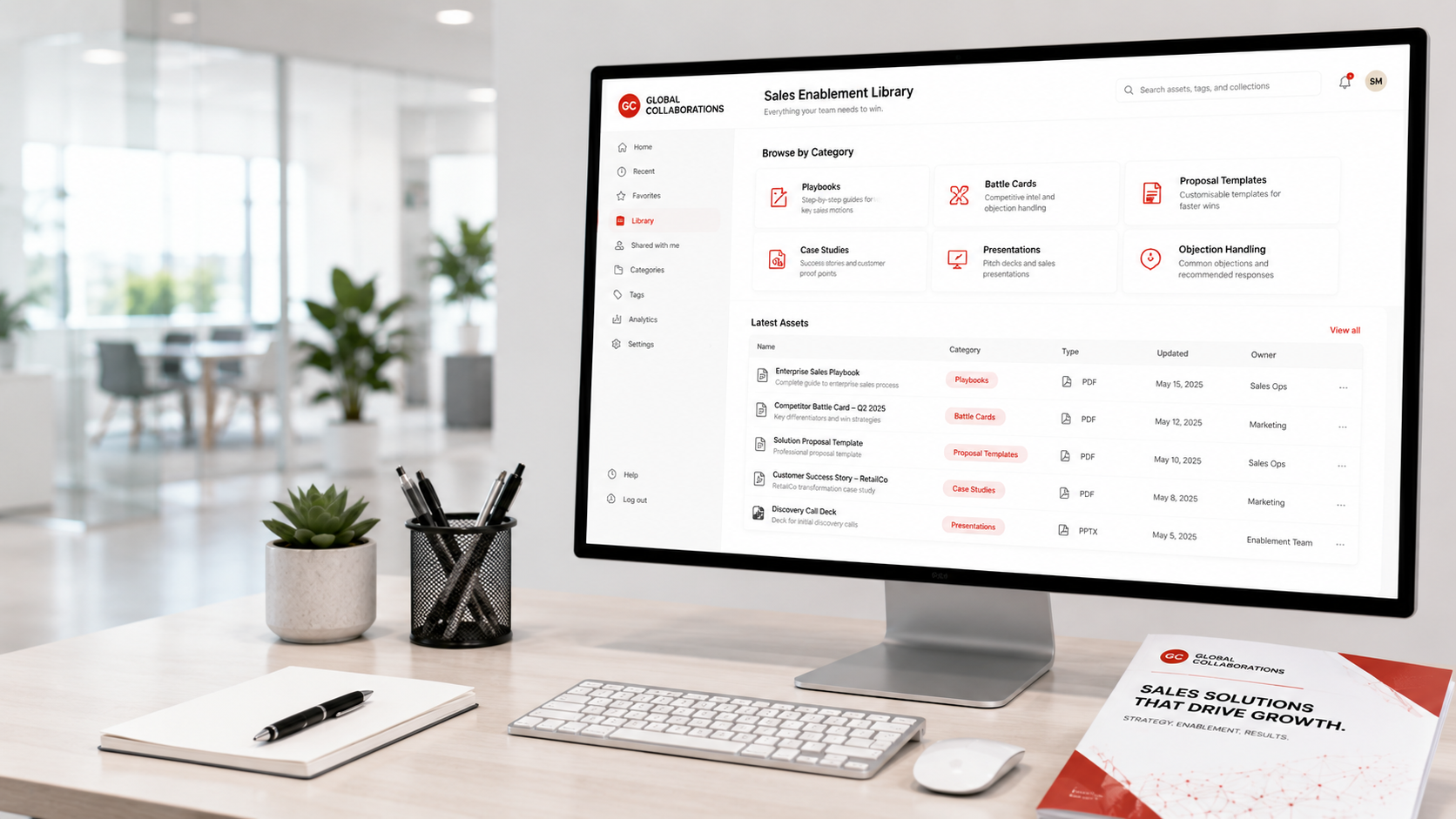
We build assets across five categories, aligned to your sales process stages:
- One-pagers and solution overviews – a concise, outcome-focused document explaining what you do, who it’s for, and what results clients achieve. Designed to be sent after a discovery call or left with a prospect after a meeting, not to replace a conversation but to reinforce it
- Industry or use-case one-pagers – variants of the core overview tailored to specific sectors or use cases your team encounters frequently. A manufacturing prospect and a professional services prospect may have the same problem but frame it differently – the assets should reflect that
- Competitor battlecards – a structured comparison for each key competitor your team encounters: their strengths, their weaknesses, how they position, how to counter their common objections, and the 2-3 questions that shift the conversation in your favour
- Objection-handling sheets – a reference card for the 10-15 most common objections your reps face, with 2-3 proven responses to each. Written for real conversations, not scripted rebuttals
- Stage-aligned follow-up email templates – email templates matched to each pipeline stage, so reps have a starting point rather than a blank page when following up after a discovery call, a proposal, or a “let me think about it” response
What you’ll get from a Sales Enablement Library build
- A core one-pager – your primary sales leave-behind, designed for readability and outcome focus rather than feature listing
- 2-3 sector-specific one-pagers – tailored versions for your top 2-3 target verticals or use cases
- Competitor battlecards – for 3-5 competitors your team encounters regularly, each with positioning summary, weakness analysis, and counter-talking-points
- Objection-handling reference – your 10-15 most common objections with 2-3 response options each, formatted as a quick-reference card
- 6-10 stage-aligned email templates – one or two per pipeline stage, covering post-discovery, post-demo, post-proposal, re-engagement, and closing follow-up scenarios
- A library folder structure – an organised file system (SharePoint, Google Drive, or equivalent) so reps can find the right asset in under 30 seconds
- A “what to send when” guide – a 1-page reference matching each asset to the sales stage and situation it’s designed for
Who this is for
Sales enablement libraries are most valuable for teams where inconsistency between reps is visible and follow-up quality varies significantly. Common signals:
- Different reps send completely different documents to prospects – some polished, some improvised
- Reps are creating their own one-pagers, emails, and comparison documents individually rather than working from shared assets
- Prospects regularly ask for a “summary of what you do” and the team doesn’t have a consistent, professional answer ready
- Competitive losses are happening on deals where the team wasn’t prepared for the competitor comparison conversation
- Onboarding new reps takes too long partly because there’s no sales asset library to hand them
- The marketing team creates content that the sales team never uses because it’s not practical for live sales conversations
Best fit: B2B service businesses with 3+ salespeople where deal values are above £5,000 and the sales process involves multiple touchpoints.
How we build your enablement library – 3 stages over 3 weeks
Week 1 – Discovery and asset audit. We review any existing sales assets (however rough), run a session with 2-3 reps to understand what they wish they had in specific selling situations, and map the asset gaps to your pipeline stages. We identify the competitor conversations happening most often and the objections coming up consistently.
Weeks 1-2 – Build. We write and design the core one-pager, sector variants, competitor battlecards, objection-handling sheet, and email templates. We work from your existing content, customer language, and proof points – we’re building practical sales tools, not marketing collateral that sounds good but doesn’t work in a real conversation.
Week 3 – Review, structure, and hand off. We present the full library to your sales lead for review, make adjustments, set up the folder structure, and run a 60-minute team session on what each asset is for and when to use it. We deliver the “what to send when” guide as a quick reference.
Results you can expect
Based on B2B sales teams that have implemented a structured enablement library:
- 20-30% improvement in proposal win rates where objection-handling assets are used consistently in the proposal and follow-up stages
- New rep ramp time reduces 30-50% – having a library of assets means new hires learn the positioning, the objections, and the competitive landscape from day one rather than over 6+ months
- Follow-up quality improves immediately – stage-aligned templates give reps a strong starting point rather than a blank page, and the consistency shows in prospect feedback
- Competitive win rate improves where battlecards are used – reps who know how to handle the “we’re also looking at X” conversation convert at a measurably higher rate than those who improvise
- Marketing and sales alignment improves – when assets are built collaboratively around real selling situations, both teams use and update them
Global Collaborations UK Ltd was founded in 2019. Our leadership brings 40+ years of combined sales and growth experience across multiple sectors.
Frequently asked questions
How long does building a Sales Enablement Library take?
Three weeks from kick-off to full library delivered and the team trained on using it. The timeline assumes your team can provide 2-3 hours of input (discovery session, asset review, and a brief review of drafts). If competitor battlecards require significant research into competitors you haven’t previously documented, add 3-5 days.
How much does this cost?
Pricing is bespoke and depends on the number of assets required, the number of competitors covered in battlecards, and whether design is included (formatted PDFs) or copy-only (editable documents). Most library builds land in the Foundation tier – £3k-£8k one-off. We scope and quote after a short call.
We have existing sales materials – can you improve them rather than start fresh?
Yes, and it’s usually faster. We review everything you have, identify what’s usable, what needs updating, and what’s genuinely missing, and build from there. Most teams have at least some assets that are worth improving rather than replacing – starting with what exists also means the output feels familiar to your team, which improves adoption.
Who maintains the library after it’s built?
The library is designed to be maintained by whoever owns your sales or marketing function – no external dependency. We include a maintenance guide covering how to update each asset type, when to review battlecards (typically when a competitor launches something new), and how to add new assets as the business evolves. For teams that want us to manage quarterly updates, that’s available as an ongoing service.
How do we make sure reps actually use the assets?
Adoption depends on two things: relevance and accessibility. The “what to send when” guide removes the decision fatigue of choosing the right asset. The folder structure means finding it takes under 30 seconds. The training session builds habits around specific scenarios. Teams that embed the library into their CRM (as linked resources in deal records or email templates) see the highest adoption rates – we can advise on how to do this for your CRM platform.
Want your team to sound consistent and confident across every deal?
A 30-minute call is enough to identify the assets your team is missing and what difference they’d make to your win rate.
Trusted by




Professional Memberships & Accreditations
We maintain active membership in leading UK and European business organizations, ensuring we stay current with best practices, regulations, and emerging opportunities for our clients.